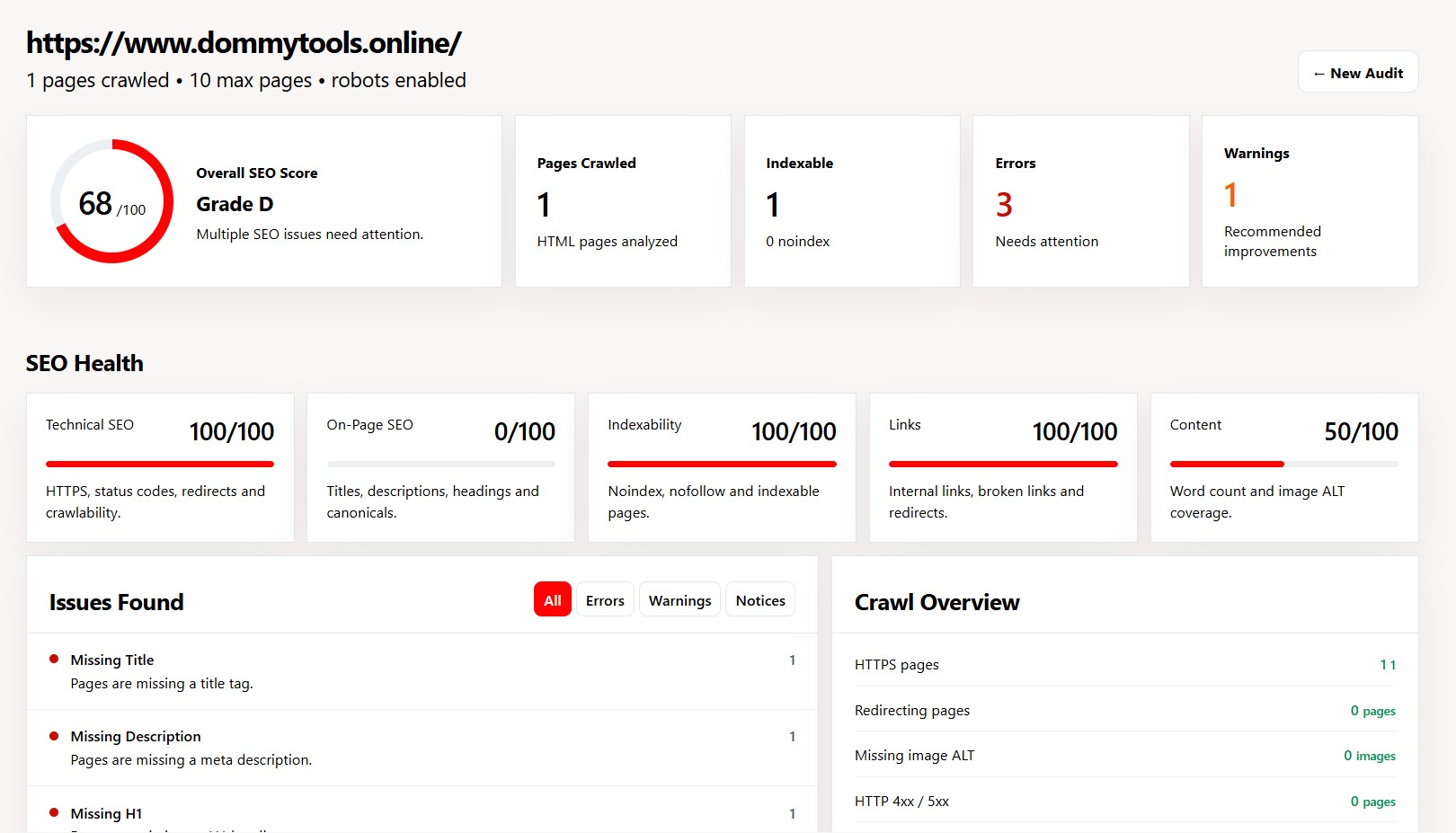
0
/100
Overall SEO Score
—
Waiting for audit data.
Crawl your website and check technical SEO, indexability, sitemap health, canonicals, links, headings, titles, descriptions and images.
Our website SEO audit looks at important technical, on-page, indexability, link and content signals.
Checks the technical foundation of your website and identifies problems that may affect crawling and accessibility.
Reviews important page-level SEO elements that help search engines understand your content.
Helps you understand which crawled pages appear indexable and which pages contain indexing restrictions.
Analyzes internal linking and basic content signals that can reveal problems across your website.
Looks at sitemap information and compares it with crawl findings to help identify URLs that may need attention.
Instead of showing only a website-wide score, the audit provides information about individual crawled pages.
Run a free website SEO audit with Dommy Tools and discover technical and on-page SEO issues that may affect how search engines crawl, understand and index your website.
Unlike a basic SEO checker that only analyzes a single page, the Dommy Tools SEO Audit can crawl eligible internal pages within your configured limits and provide page-level information about titles, meta descriptions, headings, canonical URLs, redirects, status codes, indexability, internal links, images and sitemap information.
Enter your website URL, start the crawl and review the resulting SEO report to understand what is working, what needs attention and which issues should be investigated first.
A website can look perfect to visitors and still have technical problems that make it difficult for search engines to crawl, understand, and index its pages.
An SEO audit helps identify these problems before they affect your organic search performance. It examines important website signals such as crawlability, indexability, HTTPS, redirects, canonical URLs, XML sitemaps, internal links, page titles, meta descriptions, headings, content and image accessibility.
Regularly auditing your website gives you a clearer picture of what is working, what needs improvement, and which technical issues should be fixed first.
A website SEO audit looks beyond a page's title and meta description. A technical SEO audit examines the signals that help search engines discover, crawl, understand and index pages across a website.
Dommy Tools combines website crawling with page-level analysis so that you can investigate individual URLs as well as website-wide patterns.
Check HTTPS, HTTP status codes, redirects, robots.txt and other technical crawl signals.
Analyze page titles, meta descriptions, headings and canonical URLs.
Identify noindex, nofollow, robots restrictions and other indexability signals.
Discover broken internal links and inspect internal linking relationships between crawled pages.
Compare sitemap information with crawl discoveries and identify URLs that may need further investigation.
Inspect individual URLs instead of relying only on one overall website score.
A useful technical SEO audit should examine more than just keywords. The following areas can reveal problems that affect crawling, indexing, page understanding and internal website structure.
| SEO Area | What to Check |
|---|---|
| Technical SEO | HTTPS, status codes, redirects and crawl accessibility |
| Page Metadata | Title tags and meta descriptions |
| Headings | H1 and H2 structure across crawled pages |
| Canonical URLs | Canonical declarations and URL consistency |
| Indexability | Noindex, nofollow and robots restrictions |
| Internal Links | Broken links and internal linking signals |
| Images | Image ALT text and image-related content signals |
| XML Sitemap | Sitemap discovery, URLs and crawl differences |
| Content | Word count and basic page-content signals |
An overall SEO score can be useful as a quick summary, but a score alone does not explain what needs to be fixed. A useful website audit should also show the individual pages and issues behind the result.
Dommy Tools combines an overall audit result with page-level information and categorized findings. This allows you to move from a high-level overview to the specific URL where an issue occurs.
Get a quick understanding of the website's audit status.
Group findings by severity so important problems can be reviewed first.
Find the URLs associated with individual SEO findings.
Understand findings in the context of the website crawl.
Website SEO problems can occur even when a site looks normal to visitors. A technical SEO audit helps uncover issues that may be difficult to notice during normal browsing.
Instead of checking only the homepage, the crawler can discover and analyze multiple internal pages within the configured crawl limits.
Every crawled page can be inspected individually, allowing you to understand exactly where an issue occurs.
Sitemap information can be compared with discovered pages to identify important differences that deserve investigation.
The audit combines technical SEO signals with titles, descriptions, headings, canonical URLs, links, content and images.
Findings can be grouped by severity so you can focus on important problems instead of reading through an unstructured report.
Crawl limits, depth controls and resource filtering help keep the audit focused on useful HTML pages instead of unsuitable large resources.
When robots.txt handling is enabled, applicable crawl restrictions are taken into account during the audit.
The audit is designed to make technical SEO information easier to understand for website owners, developers and SEO users.
Professional SEO platforms can provide hundreds of features, which can be useful for large SEO teams and agencies. But sometimes you simply need to understand what is wrong with a website.
DommyTools focuses on making the website audit process straightforward and understandable. You can enter a website URL, crawl eligible pages and review important technical and on-page signals from one report.
Enter your website URL and start the audit.
Important findings are organized into errors, warnings and informational results.
Go beyond title and meta-description checks with deeper crawl and indexability signals.
Inspect individual URLs instead of relying only on a single website-wide score.
Enter the URL of the website you want to analyze.
Eligible internal pages are discovered within the configured crawl limits.
Pages are checked for technical, on-page, indexability, content and link signals.
Review your score, issues, pages and technical SEO information.
Quickly check whether important technical SEO problems exist on your website.
Identify page-level problems affecting articles and content pages.
Inspect status codes, redirects, canonicals, indexability and internal linking.
Use crawl data to identify technical issues and prioritize optimization work.
Perform an initial website check before deeper SEO analysis or client reporting.
Get a practical overview of website SEO without needing an expensive enterprise platform.
Use the Dommy Tools SEO utilities together to investigate different parts of your website's technical SEO.
An SEO audit can help identify common website problems such as:
A website SEO audit is a systematic examination of the technical and on-page elements that affect how search engines discover, crawl, understand and index a website.
A technical SEO audit can reveal problems such as broken internal links, incorrect redirects, missing canonical URLs, indexing restrictions, missing metadata and sitemap inconsistencies.
The purpose of an audit is not simply to produce a score. The most useful result is a clear understanding of which problems exist, where they occur and which improvements should be investigated first.
An SEO audit can be useful whenever you need to understand the technical health of a website or investigate a change in organic search performance.
An SEO site audit is a structured examination of a website's technical and on-page SEO signals to identify problems that may affect crawling, indexing and search visibility.
An SEO crawler visits eligible website pages, extracts SEO-related information and analyzes signals such as titles, descriptions, headings, canonicals, status codes, links, indexability and sitemap information.
No. An SEO audit analyzes website health and optimization signals. It does not directly predict or guarantee search rankings.
The number of pages depends on the crawl configuration. Crawl limits such as maximum pages and maximum depth help keep the audit controlled.
The crawler is designed to focus on eligible HTML pages. Large or unsuitable resources such as PDFs and images can be ignored rather than treated as normal HTML pages.
When robots.txt handling is enabled, the crawler uses applicable robots.txt rules when determining which URLs it can crawl.
No. A missing sitemap does not automatically prevent a website from ranking. However, an XML sitemap can help search engines discover important URLs, particularly on larger or complex websites.
Find technical SEO problems before they become bigger problems.